


Choosing the best Drawing Tablets in 2024
You love drawing characters and decided to become a freelance artist. Once day you see a time-lapsed video of those fancy drawing tablets but you are like a lost ball in the high weeds…

Don’t panic! Super El Profesor at your service!
Should you buy an Ipad or Wacom Cintiq?
As a stand alone station or as a peripheral device?
Wacom or affordable Huion tablets?
Big or small drawing area?
With or without screen?
…
We won’t bore you with technical jargon, we will bore you with our very personal opinion instead 🙂
1.- What is a drawing tablet?
Have you ever trying drawing with a mouse? It is hard… but imagine that your mouse is like a pencil that perceives acceleration, angle inclination and most important… pressure!! More you push, thicker is your path.
There is marvellous software like Procreate, Painter or Photoshop that mimic any traditional medium, so it is actually like drawing on paper or painting on a canvas. It can increase your learning curve dramatically since you have all advantages of a digital environment.

El Profesor’s word:
Drawing with a mouse is harder than myself after reading a good book…
There are mainly 3 options: drawing pads also named pen tablets, drawing screen peripherals and stand alone stations. They have different features and prices that we are going to review.
We intentionally take out sketching on paper smartpads like Bamboo Folio, as El Profesor doesn’t consider it optimal for artwork production.
2.- Which are the drawing devices available?
Depending on the features we have drawing devices cheap as chips, or expensive like popcorn at the movies.

DRAWING
PADS
It is basically a pressure sensitive mouse with the form of a pencil (i.e. Bamboo).
No portable at all
Not good for drawing
The smaller the better
Hobbyist
25 – 300 US$

SCREEN
PERIFERALS
Same as the previous one but you draw over a screen (i.e. Huion or Wacom Cintiq tablets).
A bit portable
Good for any purpose.
Ideal size 21″
Advanced or Professional
300 – 1,500US$

WORK
STATIONS
Standing alone devices (i.e. Ipads, Surface or Wacom Mobile Studio).
Very Portable
Good for any purpose.
The bigger the better
Rockstars only
1,500 – 3,000 US$
So which drawing tablet is the best?
It really depends on your budget, the art you want to create and how you want to use it.
3.- What is the best drawing tablet for beginners?
Our recommendation for beginners is starting off with a drawing pad or drawing tablet. If you really have a future tied to graphic design or illustration, it will be more than enough to start off.
If not we can guess your nephew’s Xmas gift… check!
Any low range device from any top brand (i.e. Bamboo, One by Wacom, Inspiroy Huion) is a good choice for beginner artists. Keep in mind those pen tablets doesn’t include screen, so very precise tasks like freehand drawing could be tricky.

BUY A DRAWING PAD IF…
If illustration is just a temporal hobby
If you only want to paint or photo edition
Your budget is below 200US$

DO NOT BUY IF…
If you are (or try to be) a pro artist
If you want to freehand drawing
If you have more than 200US$
Which pen tablet brand should beginners buy?
At this level our suggestion is that you base your choice depending on your budget… easy as 1 2 3. Wacom is the industry standard for years so more expensive. Huion has great reviews on Amazon and are more affordable.
Which tablet size and model should I buy?
For drawing pads I would say the smaller the better so you can use it together with keyboard for shortcuts. If you have a reasonable budget, better an upper range (i.e. Intuos over One) than a bigger size (the smallest A6 is perfect).
Does every professional artist have a drawing pad?
Not really, drawing pads are not really ideal for freehand drawing or for vectors. They work beautifully for photo editing or digital painting.
Which software is better for pen tablets?
You can use it with any professional software for graphic editing, my preferred is Photoshop. You can also use it under Illustrator but it is not so smooth. For vector illustrations I rather prefer creating artwork in Photoshop and then vectorise with Vector Magic.
El Profesor’s word:
Search on Amazon for good reviews… avoid unknown brands, marry a good woman and have kids.
4.- What is the best drawing screen for pro artists?
Our recommendation for advanced or professional artists are screen tablets. They have middle range price but you can eventually create any kind of artwork. They have the best value for the money.
Any middle budget device from any top brand (i.e. Wacom Cintiq or Kamvas Huion) is a good choice for advanced or even professional artists. In this case size matters, our recommendation is any tablet between 16 and 21 inches.
BUY A SCREEN TABLET IF…
If illustration is your passion
If you specially want to freehand drawing
If you will work close to your computer
If your budget is 300-1000US$
DO NOT BUY IF…
If it is just a hobby
If you want to paint, design or photo editing only
If you need full portability
If you have a low budget
Which drawing screen brand should advanced artists purchase?
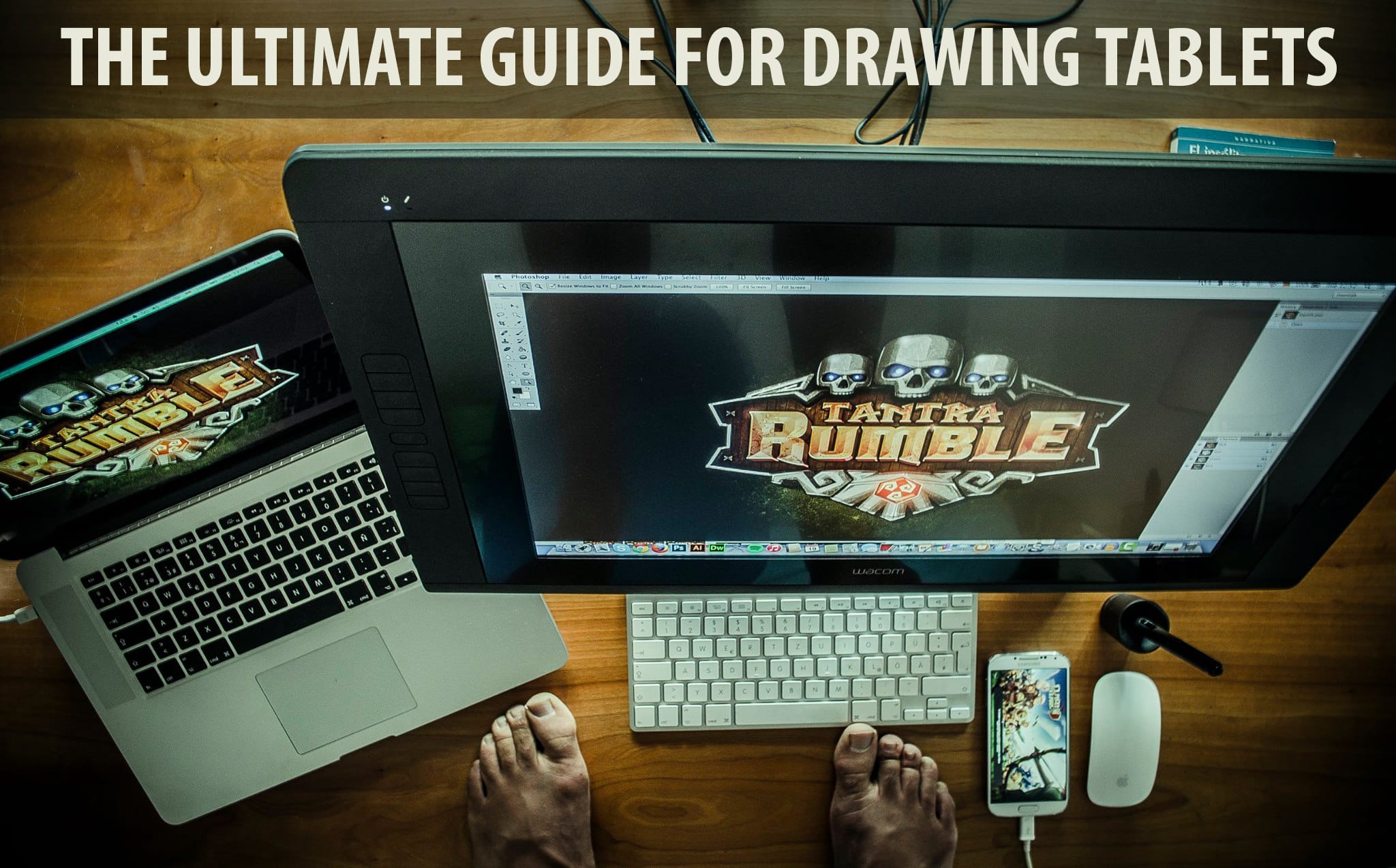
El Profesor has been a Wacom user for more than 15 years. Believe it or not, any of the 5 Wacom devices he owned (Intuos 2 A6, Intuos 3 A6, Cintiq 20″, Cintiq 13″ and my current Cintiq 21″ HD) never had a single fault. As we said, it is the industry standard so it is more expensive. Huion and XP Pen has great reviews on Amazon and are more affordable but El Profesor never tried them.
Which screen size should I purchase?
For screen tablets any size around 20″ is perfect. Space matter for him since he still uses a keyboard instead of tablet built-in express keys. Those bulky 27″ screens are just too big. So we rather prefer a handy device that can be moved and rotated than a giant and fixed one.
Which range should I purchase?
Again, it is better having a higher range than a bigger screen. El Profesor loves his Wacom Cintiq 22″ HD, it is just perfect.
Does all professional artist have a screen tablet?
It is a must specially if you are serious about freehand drawing or appreciate the extra space of a nice secondary monitor.
Which software is better for screen tablets?
Same as for pen tablets, you can use it with any professional software for graphic editing. Photoshop is the cornerstone of any professional illustrator or graphic designer while Illustrator is key for vector design.
El Profesor’s word:
5.- What is the best drawing workstation?
Those expensive work stations are also named Pen Computers. This kind of device has its own operative system so they are fully portable just like a Windows tablet. Which is the best -and only- selling point in our opinion. The biggest downside is the price and the lack of power as primary work station.
Wacom Mobile Studio with top specs (which can’t be compared to a top range laptop) are expensive as hell. And reviews are not great reviews quite good in 2024 for a device that cost +3,000US$ that now cost around 2,500US$. The lower end of the range is more affordable but it has not power enough to run heavy stuff. So it is more a secondary station than an all-terrain primary station.
At any case, for 3000US$ you can get a top refurbished Macbook Pro, a lovely refurbished Wacom Cintiq 22″ and probably a few bucks left in your pocket for a good dinner. Lots of power, lots of space, lots of options… and a full belly!
BUY A PEN COMPUTER IF…
If you already have a good primary station
If you value portability
If money is not an issue
DO NOT BUY IF…
If you don’t have a good primary station
If you value productivity
If you care about money
Which drawing pen computer should rockstart artists buy?
In our opinion, pen computers are a no go for now. Hopefully in the near future manufacturers will increase power and software developers will provide not so limited products so they can be used as primary work stations.
Do all professional artists have a Pen Computers?
Big NO. You don’t need such a expensive tool to be a pro. Buy it only if you already have a good primary station, need portability and money is not an issue.
What about Ipad Pro and Surface tablets?
Microsoft Surface tablets suffers similar limitations, expensive and not power enough to be considered as a good primary station. Perfect if you can afford an expensive secondary portable device.
Technically speaking we wouldn’t consider Ipad Pro as a work station because of the limited operative system (so limited software), but it is fully portable. Together with Apple Pencil and Procreate you can create nice artwork but you need lots of RAM to handle a decent amount layers at high resolution, which means $$$$. Again, it is not an ideal primary station… it is more a very specific tool for painting or sketching on the go.
El Profesor’s word:
There are only 2 good reasons for buying a Pen Computer: you really need a 100% portable – but limited- drawing device or you are Justin Bieber. You will pay for it at any case.
6.- What is my recommended setup for pro artists?
So… what is the best value for the money? Should I buy an Ipad or a Wacom for drawing? In my opinion, the best primary setup possible for professional artists would be a reasonably powerful laptop and a Wacom Cintiq, Huion Kamvas or XP Pen of around 20″, an Ipad Pro is a nice to have device but expensive and limited, I would buy it only as a secondary device if my budget is high enough.
WACOM CINTIQ
For everything
Everything included into the package
No software limitation
Power depends on your computer
Not Portable
Giant displays available
Primary Station
IPAD PRO
For drawing and painting on the go
Must buy Appel Pencil
Limited software like Procreate
Limited power
Portable
Limited display size
Secondary Station
Play the video to watch Photoshop + Wacom Cintiq at work:
As a secondary device, if you can afford it, an Ipad Pro + Apple Pencil + Procreate would be a good option to draw on the go. Feel free to play the video to see them at work.
Become a Professional Mascot Designer!
-
 This product has multiple variants. The options may be chosen on the product page
Learning digital drawing with Photoshop
10$ -
 This product has multiple variants. The options may be chosen on the product page
Learning digital painting in Photoshop
Price range: 6$ through 10$
Learn my best Photoshop tips and tricks about digital inking and digital coloring for mascot design. With technique and some practice you can also make a living from the characters you imagine.

Don’t miss my next Personal Project!!
Shy? ok, alternatively you can follow me at
Yeminius
Posted at 03:07h, 20 JanuaryHello
se ha llenado mucho tu blog desde la ultima vez que lo visité, congratulations
Yo tengo hace poco mas de un año una Graphire 6×8 y la verdad es que no uso ni la borradora ni los botones de atajo. No la cambio por nada (exepto por una nueva)…(mm, no, mejor no).
La verdad es que no soy ilustrador ni retocador profesional, pero con el tiempo he aprendido un poco de todo. Creo que para Photoshop y Zbrush (software de esculpido en 3d) me ha sido imprecindible.
Y a todo esto, ahce un tiempo atrás encontré este link (que no sé si será contra las leyes) pero me pareció muy interesante.
http://www.bongofish.co.uk/wacom/wacom_pt2.html
Ahí haganle click y van a saber a qué me refiero si conocen ya un poco del tema.
SALUDOS! suerte con el blog 😉
JOSE ANDRES LONDOÑO
Posted at 00:05h, 20 JanuaryHOLA, YO APENAS ESTOY INICIANDOME EN EL DISEÑO, QUE ME ACONCEJAS, DEVO MALACOSTUMBRARME A LA TABLA DE UNA VEZ, O APRENDO PRIMERO CON EL RATON? GRACIAS.
Sergio Ordonez
Posted at 23:12h, 21 JanuaryJose Andrés, como digo en el post todo depende… si tienes dinero obviamente es buena idea.
Yeminius, pues se me olvidó esa utilidad (la del 3d), supongo que si que es buena ayuda. Muy interesante ese link, quien tuviera esos conocimientos de electrónica eh?
Gracias 😉
Sergio Ordonez
Posted at 20:31h, 22 JanuaryHola Inedeo, realmente con Mac funciona bien, el problema es bajo Windows, a saber cual es el problema… de todas formas nada grave, reiniciando Photoshop todo solucionado.
Saludos 😉
inedeo
Posted at 18:40h, 22 Januaryhola sergio yo creo que te fallla la tabla por el sistema con mac yo solo uso photoshop y nunca molesta y las sensibilidad perfecta.
Saludos y abrazos
Alexis
Posted at 06:01h, 24 Januarymuy muy bueno, con tu permiso lo publico en mi web 🙂
Saludos!!
Yeminius
Posted at 16:07h, 24 JanuaryJose, si yo hubiese tenido mi tabla cuando empezé con esto yo creo que me hubiese ahorrado muchisimo tiempo. Te da mucha más libertad para crear. te lo aconseja un newbie feliz con su tabla y muerto sin ella, bye!
Fox
Posted at 09:32h, 27 JanuaryEres un jodido genio. Ni más ni menos. Nunca había encontrado una web tan ilustrativa e interesante sobre diseño gráfico e ilustración.
Yo mismo estoy a punto de sacarme el título (el de FPS en la modalidad de ilustración) y ando algo preocupado porque mi nivel como ilustrador es mediocre tirando a bajo y tengo muchas dudas acerca de si podré vivir de esto en el futuro.
Pero a partir de ahora prestaré mucha atención a tus tutoriales, a ver si se me pega algo de tu talento.
Por cierto, yo tengo una Bamboo y de momento me arreglo a la perfección con ella. Eso sí, la graphire A5 caerá en breve. No creo que necesite más.
FOXXXXXXXXXXXX
PD: Una sugerencia, si se me permite el atrevimiento. Tu que estas dentro de este mundo, estaría bien que escribieses algún post acerca de cuales son los programas clave que necesita dominar un diseñador para encontrar trabajo y posicionarse en la industria.
Sergio Ordonez
Posted at 18:31h, 27 JanuaryHola Nacho, no es para tanto pero te agradezco 🙂
Sobre los programas clave, el standard son Photoshop para bitmaps, Illustrator para vectores, Flash para animación, Dreamweaver para web… el software en sí no creo que sea importante, si no lo que puedes hacer con él.
Sobre el talento no te puedo hablar, de eso tengo poco, lo que te aconsejo es que practiques mucho.
Muchas gracias de nuevo, me alegra que SOSNewbie te parezca tan buena.
Saludos.
Ava
Posted at 18:34h, 08 FebruaryGreat information and a great site for beginners and the seasoned designer alike. Thanks for your time in putting up all of this great information. Very much appreciated.
Boreale
Posted at 19:41h, 13 FebruaryI wrote a long comment, but it seems WordPress doesn’t want it… ;-(
Jonathan Betancur
Posted at 23:52h, 13 FebruaryWow, Sergio, primero que nada te felicito por tu blog, de gran ayuda, muy bueno el trabajo que haces, este articulo me ha servido un monton, me aclara el tema de las tablas, igual me compre la mia (grandota y Genius, ojala hubiera encontrado tu post antes jejej) hace ya un par de semanas y la verdad no la cambio por nada, el rollo es que a veces en PSD se pone lenta y hay q esperar unos segundos, eso medio me saca de mis casillas pero bueno.
Que buen Blog.
Saludos.
Sergio Ordonez
Posted at 16:21h, 14 FebruaryHola Jonathan, no hay de qué 🙂
Sergio Ordonez
Posted at 14:11h, 15 FebruaryHello Boreale, not sure what is the problem. Please try again, if not send it by email, please.
Thanks.
Sergio
Jesper Bram
Posted at 11:44h, 20 FebruaryHi Sergio,
Just found your blog. Excellent stuff. I have the new 12 inch cintiq at work, and I’m very happy with it.
Also have an old graphire I never really got used to. But I need a tablet at home as well, and the screen ones are a bit heavy on the wallet. So your advice was really great, thanks.
Sergio Ordonez
Posted at 19:17h, 20 FebruaryHello Jesper, thanks a lot.
Ah!! cool, Im going to Berlin tomorrow and I plain to test the Cintiq 21 and 12 inches. My worry about the 12″ was that maybe its too small, what do you think? its confortable and big enough to draw? What about the color accuracy?
If its big enough I think the 12″ is great, much more portable and affordable.
Please share your thoughts.
Cheers.
Sergio
PS: you have some nice designs 🙂
Jesper Bram
Posted at 08:19h, 21 FebruaryNever worked with the 21, so I really can’t tell. But there’s no doubt I’d like to have more screen real estate.
The 12 inch gets the job done and I’m not sure that the 21 is so much better to justify the price difference.
What I do is, have a total view of what I’m working on open on my main screen, and then work with the details in a zoomed view on the cintiq.
Not sure about color accuracy. I’m so used to not relying on what a monitor shows me, that I “use the force” (and the values) a lot when working with color. So I haven’t put much thought to it. Also only had it for like a month, so the main focus have been on how it feels to work with.
If you make any discoveries regarding colors etc. please post it.
Sergio Ordonez
Posted at 13:43h, 21 FebruaryNice, I was thinking was a good idea having the monitor and the Cintiq since looks like the tablet allow it. Though for the 21″ I will need a big desktop (monitor + cintiq + keyboard)… its another thing I want to test, how confortable is it.
Im in Berlin right now, I will try to test both and hopefully I will make a choice.
Thanks for sharing your experience Jesper.
Cheers
morcio
Posted at 09:57h, 24 Februaryeh…. yo hace tiempo me compre una Genius… que tanta comparacion tiene contra la Wacom?
saludos!
Sergio Ordonez
Posted at 12:24h, 24 FebruaryHola Morcio, supongo que dependerá del modelo. Las Wacom son famosas por su calidad, por su sistema de resonacia (nada de pilas), por su ligereza, por su diseño y compatibilidad…
Si quieres ponme el modelo de tu tabla y echo un ojo a las características.
Saludos.
morcio
Posted at 10:07h, 25 FebruaryHolaa Sergio xD
este pues mira esta es la que tengo…
http://www.genius.hu/kepek/digitabla/nagy/MousePen8x6_h.jpg
en la parte de atras dice…
MousePen 8×6
PenTable
Made in China (woow… sorprendente… xD)
etc etc =___=
Sergio Ordonez
Posted at 12:26h, 25 FebruaryPues todo parece correcto, demasiado para el precio que tiene.
Tiene 1024 niveles de presión, lo que me parece bastante para unos 40€.
La principal pega es la de siempre, las baterías. Wacom usa un sistema de resonancia patentado por la marca, por lo que es más cómodo al no tener que usar pilas, y más ligero.
Eso es todo lo que puedo decir sin haberla usado.
Saludos.
ALEX
Posted at 14:13h, 26 FebruaryPues en mi oficina tengo una WACOM de 12×12″ y pues es una maravilla, navegas en general súper rápido!!.. pero es muy incomoda.. es muy grande.. de echo es la penultima más grande de esa serie… les recomiendo una más chica.. en mi mesa o entra el teclado o la tableta jaja.. pero de ahi… todo esta perfecto.
http://www.flickr.com/photos/a2diseno/751945258/
esa es mi tableta.
SALUDOS
Sergio Ordonez
Posted at 15:09h, 26 FebruaryHola Alex, prohibido matar al personal de la envidia, degenerao!!!
Ya puedes ser un maestro diseñando, con ese equipo no serlo sería sacrilegio 😛
Saludos.
Sergio
PS: Espera que me compre la Cintiq, subiré una foto de mi nueva mascota 🙂
Carlos
Posted at 09:20h, 08 MarchAyer que encontre tu pagina y ya me lei todos los post, esta genial, no habia conseguido ninguna pagina con informacion tan clara y directa.
Muchisimas gracias por publicar.
Saludos!
Sergio Ordonez
Posted at 02:40h, 09 MarchHello Toki, I would buy the smaller one because its much more confortable and cheaper. I dont see any problem with lefties… really I dont see any difference.
I hope it helps.
Toki Tover
Posted at 00:34h, 09 MarchHello,
I am highly interested in learning your craft, I love this type of art. I mainly do graffiti art but I wanted to be able to apply that to graphic design and make a side biz out of it. I was reading some reviews of the “Intuos3 4×6 Wide” tablet and read one that said it was not that good for lefties. I am left handed. What are your thoughts on that? Thanks for your time and knowledge!
Toki
Toki Tover
Posted at 23:30h, 09 MarchHey Sergio,
I appreciate the reply! I found one of those for $200… I cant wait to get started. Thanks again,
Toki
Sergio Ordonez
Posted at 09:48h, 10 MarchHola Montse, pues lo que digo en el post, depende del uso que le quieras dar y principalmente del presupuesto que tengas. Si tienes esos 230€ yo iría a por la Intuos3, si no ve bajando de gama.
Saludos.
Montse
Posted at 09:06h, 10 MarchHola!
Excelente manual para los que estamos pez, muchas gracias.
Si no es mucho pedir, me gustaría vuestro consejo personal: quería hacerle un regalo a mi novio, pero no tengo ni idea de qué tableta escoger, ai amateur o intermedio. Trabaja en ello y lleva tiempo para comprar una, pero no se decide y yo no tengo ni idea de diseño gráfico. Sé que utiliza sobre todo Photoshop y Corel para vectorizar y demás.
Me podéis echar un cable??
Muchas gracias y un saludo 🙂
jopicar
Posted at 20:41h, 10 MarchSupongo que ya lo sabrás, pero por si aca aquí te dejo el enlace que creé hacia este fantastico tuto 🙂
link
Un saludo Sergio, crack! 😉
Sergio Ordonez
Posted at 00:08h, 11 MarchMuchas gracias Jopicar 😉
alejandro
Posted at 12:29h, 17 Mayhola sergio, mira tengo muchas ganas de comprarme una tabla digitalizadora, me manejo mejor con los vectores que con los bits map, y aunque no tengo problemas con ellos me gustaria saber como funciona la tabla digitalizadora a la hora de trabajar en illustrator.
Se nota que eres una gran persona, muy culta y que tiene mucha devoción por esta profesión, gracias por ayudarnos, EXITOS!!!!
Ehab
Posted at 15:25h, 17 MayI am a big fan of Wacom as well, but they are so expensive in my Country. Plus they are not always available, you have to order it and they get it for you from Singapore or so. They charge almost double for it.
I have a Genius and it says it ahs 1024 levels of sensitivity, but I haven’t seen its usage :S
Sergio Ordonez
Posted at 23:21h, 17 MayHola Alejandro, ni tan culta, ni tan buena, ni tan devota, soy un pecador 😛
No me hagas mucho caso (hago el 99% de mi trabajo con Photoshop) pero creo que hay programas de diseño vectorial que te aceptan diferentes niveles de presión. No estoy seguro si Illustrator lo hace, para vectores prefiero el ratón.
Si quieres meterte con los mapas de bits entonces te la recomiendo al 200%.
Saludos 😉
Sergio Ordonez
Posted at 23:03h, 18 MayHello Ehab, same here, in Europe we pay around 30% more than USA… its a shame but it worth it.
Did you try by Ebay?
alejandro
Posted at 08:40h, 21 MayNuevamente…
Gracias por todo. Me diste el impulso que me faltaba para ir a por la tabla. Me gustaría ponerme en contacto con vos por messenger y compartir también el trabajo que realizo con vos, si te interesa la idea agrega mi correo que es [email protected] (como ya verás ahi). Acabo de hacer el depósito bancario para comprarme la Intuous a6, estoy ansioso y nervioso, comprar por internet en argentina (y en todo el mundo tal vez) es arriezgado, pero bueno… Saludos
artgoround
Posted at 11:02h, 08 JuneOther pens are useless? You’re nuts and have obviously never used a 6D Art Pen and, say, a pallet knife brush with it’s Angle setting to rotation. Why manually change the degree of your brush when you can rotate the pen in your hand?
Also, the function keys on the tablet are essential, not useless. Why put your hand up on a keyboard when you can do everything from an express key right next to you? I set my free hand function keys to Undo, swap monitors, eye dropper, pressure hold, and + – brush size all with one hand while the other hand is painting. Never mind the other 5 functions on the other side like zoom, and a bunch of other fast shortcuts and pop menus.
You should learn how to utilize your tablet and use different pens. (they’re not called pencils) You don’t seem to know your tablet very well.
Sergio Ordonez
Posted at 16:39h, 09 JuneHello Artgoround, thanks a lot for sharing your knowledgement, its much appreciated.
I have been working 8h per day during the last 4 years with my wacom tablet (now I have a Cintiq) so I have some idea about Wacom tablets. It doesnt mind Im a Wacom God… its just my opinion, based on my particular experience.
I preffer a keyboard because I use every tool and command by shortcuts, when you are professional and work so many time in front of the computer, it saves lot of time. Express Keys are quite limited in my opinion.
You can see my portfolio at http://www.sosfactory.com, all what you see there (and much more) is done with a pen, no other tools needed. If you are an experienced user, the pen is enough to do whatever you need.
Cheers.
alectro
Posted at 05:45h, 09 JulyGreat article Sergio, recently I bought a Bamboo tablet in China and I am really happy with it. I can’t imagine what would be to have a cintiq.
Now, with my tablet I improving my drawing techniques, is a must have to any designer/illustrator.
Have a nice day.
Sergio Ordonez
Posted at 07:30h, 16 JulyIm not sure but it comes with a copy of photoshop or painter essentials. The best is you look for a full version of Photoshop.
Fiona
Posted at 03:44h, 16 JulyI was wondering what programs come with a wacom graphire.
LostDZ
Posted at 12:20h, 06 SeptemberSolo decir que… voy a comprar una Intuos, ya me hace falta, estaba con una cutre Bamboo, y a5. Bueno, supongo que me entiendes.
psychopathkitty
Posted at 14:50h, 27 NovemberHi,
thanks for the great info! I’ve been drawing since I’ve known myself but recently decided to go digital (: and was looking for some advice on graphic tablets. You’ve been very very very helpful thank you alot.
cheers.
Aaron
Posted at 17:53h, 25 DecemberGreat info.
I’m going to get one to aid in my t-shirt designs for Blazingwear.com.
vpla21marzo
Posted at 05:40h, 08 JanuaryWacom Bambuu fun A5 vs wacom Intuos3 A6
Hola yo me compre hace unos cuantos días la wacom bambuu fun de tamaño A5 y la verdad que estaba genial, la unica pega que encontraba es que me parecia muy grande, porque la verdad que para dibujar y retocar bien, pero para manejarte por los menus se hace un poco incomodo tener que moverte por toda la tableta para alcanzar los menus. Así que decidí cambiarla y pillarme la intuos que aunque de tamaño inferior que la bambuu su precio era unos 40 euros mas caros, y la verdad es que se maneja mucho mejor con un tamaño mas reducido, se te hace mas comodo moverte por toda la pantalla y para dibujar hacer trazos y retoques fotograficos te sobra ese tamaño, porque en verdad uno nunca hace trazos tan grades siempre va haciendo detalles o pinceladas que con un tamaño A6 sobra.
En cuanto a diferencia “aparte de las del tamaño” entre la bambuu y la intuos, si no eres profesional o demasiado exigente no importan, a modo de ejemplo es como si con una dibujases con un boligrafo bic corriente y con la intuos como si lo hicieses con una estilografica para dibujo, se nota sobre todo el los trazos finos, la intuos al tener el doble de niveles de presión y de dpis en la tableta, los trazos finitos se hacen con mayor precisión (como he dicho es como dibujar con un pilot o con bic). Luego aparte la intuos detecta el angulo de inclinación del lapiz, cosa que la bambuu no, lo cual la verdad es que es util para herramientas como puede ser el aerografo, ya que al inclinar el lapiz el esprai da el efecto de espansion hacia el lado que inclinas. Por lo cual esta opcion para la gente que no lo requiera, tampoco es muy necesaria.
Mi opinión personal, teniendo en cuenta mi experiencia con ambas, es en cuanto tamaño: Mucho mas ergonomica y practica un tamaño pequeño A6 que el grande A5 (aunque creais que cuanto mas grande mejor, que era lo que yo pensaba al principio, mejor mas pequeña) Y en cuanto a modelo esta claro que el intous es mejor que el bambuu, pero segun para lo que uno lo quiera y lo exigente que sea no vale tanto la pena, pensar que entre un bambuu A6 y un intuos A6 hay casi 200 euros de diferencia.
Por lo tanto si no quieres gastarte mucho y tener un producto fantastico quedate con la bambuu A6, si quieres mas prestaciones vete a una intous A6, la bambuu A5 la desecho por que el tamaño no es practico a mi juicio.
Espero os ayude en la eleccion. Un saludo a todos.
vpla21marzo
Posted at 05:48h, 08 JanuaryPor cierto se me ha olvidado decir, aunque creo que en relacion precio, como he dicho lo mejor es quedarte con la bambuu A6, yo me quedé con la Intous A6, porque aunque es mas cara, yo soy bastante exigente, y despues de probar una intous no quieres volver a la bambuu jajajajajja.
Saludos de nuevo.
Sergio Ordonez
Posted at 20:55h, 08 JanuaryMuchas gracias por un comentario tan bien argumentado, además coincido contigo.
Mejor invertir en una mejor gama (Intuos) que en una de mayor tamaño. Para mi la elección perfecta es la Intuos 3 A6.
Saludos.
José Miguel
Posted at 03:54h, 20 JanuaryHola, pues yo apenas estoy estrenando una Macbook de las de aluminio, tengo la suite de adobe CS3, y pues etoy buscando opciones antes tenia una pc de escritorio con el xp pero por razones en que con windows a veces se podian colar viruses y x cosas pudiendo perder la info me mudé a Mac, esto se los cuento porque tengo un primo el cual estudia Comunicacion visual, y el tiene una pc de escritorio y una macbook, en la macbook usa una wacom bamboo y en la pc usa una de genius, debido a que se comporta de mejor manera en la mac la wacom, aunque me ha dicho que de repente el trazo se ve salteado, es decir si uno hace un trazo muy detallado y lento el lapiz o cursor se llega a brincar ciertos pixeles… el ha visto que su genius en pc tiene lo del grosor o presion y la wacom no no se si sea por el sistema mac os tiger pero esa es la experiencia de mi primo, yo por mi parte aun sigo usando el pad que trae la macbook (la almohadilla o mouse) y obvio es incómodo eh inpreciso, pensé en comprarme el mighty mouse alambrico porque aunque existe el bluetooth no me gusta eso de andar con pilas.. xD mi pregunta es.. seria mejor comparme una bamboo, una graphire o una intuos? o en dado caso mejor el mighty mouse?
Me dedico a realizar diseño web, uso flash, dreamweaver, photoshop (interfaces) ilustrator y swift 3D
Que me recomiendan?
De momento no tengo dinero para comprarme algo de escritorio (pienso comprarme una iMac despues xD) asi que que me recomiendan para trabajar sobre esta portatil?
Sergio Ordonez
Posted at 08:32h, 20 JanuaryHola José Miguel,
Primero me plantearía si realmente necesito una tabla digitalizadora. Como digo en el post, para diseñar no hace falta, es útil para dibujar y sobretodo para pintar o colorear.
Si tu presupuesto te lo permite ve a por la Intuos 3, con el modelo más pequeño tienes de sobra.
Yo he abandonado los PC de sobremesa por un portatil y estoy muy contento, siempre y cuando tengas un buen monitor secundario (por el tema de los colores).
Lo que le pasa a tu primo es un poco raro, las Wacom funcionan igual de bien con PC como con Mac.
Saludos 😉
Jose Miguel
Posted at 13:29h, 20 JanuaryHola muchas gracias por la pronta respuesta, lastima que no tienes un suscriptor de post para los avizos xD
Pues en efecto, creo que como tu me dices no me hace falta tal vez es sólo por ver que todo diseñador la tiene xD
Pero no se si al menos tu me podrias aconsejar sobre un buen mouse ya que si no tengo una tableta ps aunque sea un buen mouse, me recomiendas el mighty mouse inalambrico? o crees que hay alguna mejor opcion? Lo que pase es que entré a la pagina de apple y el mouse con cable es optico (luz infraroja reflejada) y el inalambrico es laser, pero usa pilas… conocerás alguna mejor opcion? algo de cable para evitar las pilas pero que se muy bueno y preciso xD Perdon por salirme del tema de las tabletas xD
Sergio Ordonez
Posted at 17:08h, 20 JanuarySí Jose Miguel, además del suscriptor para los avisos necesitaría hacer muchas más mejoras, pero por desgracia no hay tiempo. Se aceptan voluntarios 🙂
Sobre lo del ratón no sabría decirte, los dos haría el trabajo igualmente, sólo cuestión de gustos y presupuesto.
Saludos.
Sergio Ordonez
Posted at 18:16h, 20 JanuarySorry, I have no idea, I just tested it with the most popular softwares and it works.
Cal
Posted at 17:50h, 20 JanuaryAny idea if the Intuos3 works well with hiragana/katakana software?
José Miguel
Posted at 00:44h, 23 JanuaryBueno pues al fin me decidí por comprarme una intuos3 de 4×6, ya que aqui en mexico estan bastante caras, esta me salio en 4200 pesos equivalentes a 400 dlls :-S
Y por un mouse de logitech, el LS1 es laser, alambrico y bonito ademas de ser compatible con OS X
Sin mas ni menos gracias por el tuto xD saludos!!
Alma
Posted at 17:21h, 24 JanuaryEs estupendo tu blog, te felicito Sergio.
Entré en el buscador para informarme sobre las tabletas digitales y después de leer las preguntas que te hacen y tus respuestas creo que mis ideas se han aclarado bastante. Yo dibujo y pinto en mi tiempo libre solo por placer, y como la ilusión no tiene precio seguiré tus recomendaciones y consejos acertados para las personas que nos iniciamos en esto.
Saluditos.
patricia hallman
Posted at 12:10h, 23 Februaryi need help i need a tablet that i can use to help with digitizing to embroidery on a professional machine. i’ve been paying someone to digitize my designs what do i need . my email is [email protected]
Sergio Ordonez
Posted at 09:48h, 25 FebruaryHello Patricia, not sure what do you plain to do but the tablet is just a tool, it can help though there is lot of things to learn more than using a tablet.
Also not sure what kind of design are you going to do. If its vectors the tablet wont be a big improvement.
Show me some image so I can be more specific.
Cheers.
Hugo
Posted at 13:27h, 06 JunePOR FAVOR QUE NO SE ENGAÑEN A LOS MUCHACHOS DICIENDOLES QUE WACOM ES LA MEJOR
WACOM???!!! LA MEJOR JAJíAAA …. “SI NO TIENEN TALENTO PARA EL ARTE Y EL DIBUJO… NI WACOM NI WUAQUITO LES VA A SERVIR”.
E VISTO TUS TRABAJOS Y SON CARICATURAS. LA VERDAD PARA ELLO NO NECESITO NINGUNA TABLETA ESO LO ARIA EN PAPEL Y LO ESCANEARIA Y LISTO NO ES NADA DEL OTRO MUNDO, OTRA COSAS ES QUE LA TABLETA TE FACILICE MAS EL TRABAJO YA QUE TE AHORRA MAS TIEMPO.
PERO ESO DE RECOMENDAR SOLO LA WACOM ESTA MUY MAL. “HAY TABLETAS MUCHO MAS ECONOMICAS” Y DE PRESTACIONES SIMILARES…. EL ECHO QUE CUESTEN MAS Y ESTEN BIEN RANKEADAS, NO SIGNIFICAN QUE SEA LA MEJOR.
AQUí UN EJEMPLO: http://www.youtube.com/watch?v=rFaOFr3K1DM Y FIJENSE EN QUE TABLETA REALIZA SUS TRABAJOS UN VERDADERO ARTISTA.
PINTURA DEL MISMO ARTISTA: http://www.youtube.com/watch?v=ssOJQXdwmrI&feature=related
EL RESTO DE SUS TRABAJOS LO PUEDEN VER AQUí: http://www.youtube.com/user/macpulenta
SUS PINTURAS SIEMPRE LOS REALIZO CON UNA GENIUS, POR ELLO LA EMPRESA LO LLAMO PARA QUE LO REPRESENTE.
ME RECUERDA CUANDO FUI A DAR MI PRIMER EXAMEN DE PINTURA, EL PROFESOSR NOS DIO UNA HOJA EN BLANCO Y UN PEDAZO DE CARBON, SIIII “CARBON” LO QUE QUEDA DESPUES DE QUEMAR UNA MADERA.
Y TODOS LE MIRAMOS SORPRENDIDO, Y EL PROFESOR NOS VIO Y NOS DIJO: “ QUE..!!!, QUIEREN UNA WACOM?”
🙂
Hugo
Posted at 14:14h, 06 Junesorry se me paso 🙂 por cierto bonitos trabajos, un saludo.
Sergio Ordonez
Posted at 23:43h, 06 JuneHola Hugo,
no es que yo diga que Wacom es la mejor marca de tabletas (que lo digo) es que objetivamente lo es, y el que diga lo contrario es que no se ha molestado en mirar las especificaciones técnicas. Yo sí que lo hago:
NIVELES DE PRESION
Genius M712: 1024 niveles de presión
Wacom Intuos4 A6: 2048 niveles de presión, si no me equivoco es el 200% más sensible.
BATERIAS
Genius M712: el lápiz utiliza baterias, aumentando el coste y el peso del lápiz.
Wacom Intuos4 A6: te ahorras la bateria y el peso extra, va por resonancia, patente exclusiva de Wacom.
EXTRAS
Genius M712: lápiz
Wacom Intuos4 A6: lápiz + ratón, muy cómodo para navegar.
PRECIO
Genius M712: 250US$ parece que ya la están vendiendo a 130US$ por Amazon y pronostico que bajarán aún más porque nadie con un mínimo de conocimiento la va a comprar a ese precio.
Wacom Intuos4 A6: 200US$ (hay versiones más baratas de igual prestación que la Genius M712).
Sin contar que Wacom es la compañía pionera dedicada exclusivamente a la fabricación de tabletas, con un catálogo de modelos desde apenas 60US$ hasta los 2000US$ mientras que Genius no. Esto quiere decir que con Wacom nunca te quedarás colgado por discontinuidad en los productos y que tendrás accesorios, consumibles, mejoras de software, incluso tienes opción de revenderla cuando te actualices ya que aguantan bastante bien su precio de mercado.
En lo único que estoy de acuerdo contigo es que la tabla es sólo una herramienta, si no sabes dibujar no hará el trabajo por ti, pero si sabes, trabajarás más rápido y más cómodo… que si como yo, eres profesional, es de lo que se trata.
Si encuentras una sola review de cualquier experto que valore mejor cualquier marca que una Wacom, por favor, muestrame el enlace.
Al menos dime en que especificación técnica las Genius superan a las Wacom.
Saludos.
Sergio
PS: antes de acusarme de engañar a la gente deberías informarte.
PS: por favor, no uses mayúsculas e intenta escribir sin faltas de ortografía.
José Salazar
Posted at 21:20h, 07 JulyHola Sergio con mucho agrado leo tus consejos, tengo una inquietud, pues mira yo soy estudiante de economía y tengo que realizar gráficos no tan complicados sobre los diversos modelos económicos. Además
de realizar muchos resúmenes, notas matemáticas, tú crees que me sea útil una tabla, sabiendo que yo nunca he realizado trabajos de arte digital sólo me importa el hecho de escribir a mano mis notas y los gráfico en una pc muchas garcias por tu respuesta.
Sergio Ordonez
Posted at 07:02h, 08 JulyHola José, no creo que una tabla sea lo que necesites, para ese tipo de tareas creo que es mejor teclado y ratón.
Si quieres escribir a mano tus notas quizás sea más práctico una PDA por eso de la portabilidad, pero la verdad que no sabría aconsejarte.
Yoshiro
Posted at 12:46h, 18 AugustHola Sergio, impresinante tu blog y tu trabajo.
he leido tus post y son muy interesantes,
fíjate que estoy en una gran duda.
Actualmente quiero cambiar mi tableta, una genius, por una wacom. Me voy a reivindicar.
Soy publicista,me dedico más a anuncios de radio y tv que a diseñar,diseño algún anuncio de vez en cuando esto es responsabilidad directa de alguien más.
Pero me gusta el diseño y lo hago más por gusto que por responsabilidad. La cosa es esta:
Había pensado en comprarme una bamboo pero viendo la intuos4 me parece increíble, es mucho más cara pero quisiera tu opinión.
La intuos 4 es más para ilustradores?
me quedará de sobra? o como me gusta el diseño la podré aprovechar?
Lo pregunto porque la inversión si es bastante.
Gracias y éxitos
Sergio Ordonez
Posted at 16:43h, 18 AugustHola Yoshiro, muchas gracias 🙂
Las tablas son más para pintar que para dibujar or diseñar. Para dibujar es bastante complicado, y para diseñar casi que me quedaría con el ratón.
Si te lo puedes permitir las Intuos 4 es genial, si no, yo creo que una Bamboo sería más que suficiente.
Yoshiro
Posted at 15:20h, 19 AugustMil gracias por la ayuda,
me iré por la bamboo.
un gusto revisar tu página y encontrarme con todo ese material.
Sergio Ordonez
Posted at 19:49h, 20 AugustHola Alfredo, muchas gracias 🙂
Yo empecé con una Intuos 2 hace unos años cuando era estudiante de Psicología, y tenía la misma duda. Por suerte mi novia me convenció de que me la comprara y fíjate… ha sido clave en mi carrera, aunque seguramente hubiera hecho lo mismo con una de gama más barata.
Si realmente te lo puedes permitir, y de verdad (digo: de verdad, de verdad) te gusta la ilustración yo me daría el gustazo de comprarme una Intuos 4.
Otra opción sería buscar una Intuos 3 por ebay, incluso una Intuos 2 que técnicamente son similares, a ser posible nuevas aunque incluso usadas no suelen dar problemas. El salto lo da la versión 4 que tiene el doble de niveles de presión.
Si es un hobby pasajero y no quieres arriesgar entonces ve a por la Bamboo, prueba un tiempo y posiblemente te des cuenta que no necesites nada más, de hecho puedes conseguir los mismos resultados que con una Intuos… lo que cuenta son tus manitas 🙂
Espero haberte ayudado.
Saludos
Alfredo Artiga
Posted at 16:04h, 20 AugustHola Sergio, impresionante tu sitio felicidades.
Al igual que Yoshiro trabajo en publicidad con la diferencia que mi responsabilidad es con los gráficos. Ademas soy fotógrafo y le entro mucho al retoque digital así como Full photoshop en mis laboras diarias. Después de leer este foro, quedo mas que convencido que el ratón no es lo mio, sabia que había una herramienta mas útil que este ultimo, para pintar!! pero no sabia cual.
La cuestión es, que después de investigar ampliamente he aterrizado en 2 opciones: la Bamboo o la Intuos4, las de menor tamaño por comodidad.
No soy profesional en la ilustración, pero así empece en la fotografía, siendo entusiasta y ahora me va muy bien, tengo muchas ganas de pulir mi calidad de ilustrador y tengo miedo que me quede corto una Bamboo al poco tiempo y como que me sobre herramienta con una Intuos o como quien dice gaste de mas matando cucarachas con una escopeta ¿que recomiendas para un diseñador gráfico, fotografo iniciándose en el mundo de la ilustración? Bomboo o Intuos4?
Espero puedas orientarme y te felicito por tu trabajo, es muy inspirador.
Saudos
Metalhead
Susana
Posted at 07:46h, 20 SeptemberHola Sergio
te escribo para darte las gracias por este magnífico manual.Para mí ha sido de gran ayuda.No soy ni diseñadora gráfica,ni nada por el estilo.soy una persona autodidacta que hace las cosas con ilusión y paciencia.
Digo todo esto por que ahora soy la feliz propietaria de una intuos 4.
Ayer empecé a utilizarla y estoy encantada.Se que necesitaré tiempo para mejorar,pero no me preocupa.
Hace un mes y medio que instalé Photoshop y gracias a gente como tú,que dedica tiempo a darnos explicaciones a los que no tenemos idea,ya hago mis propias creaciones,con bastante éxito. así que,de nuevo gracias por inspirarnos y ayudarnos,gracias por la paciencia y la buena educación que demuestras tener después de leer algún que otro comentario que te han hecho.
y para finalizar te dejo con una preguntita a ver que me aconsejas:
(aún no he registrado la wacom por que tenía esta duda)
Autodesk sketchbook express 2010 o Corel Sketchpad(teniendo en cuenta que la otra opción es photoshop elements que la descarto por ya tener photoshop cs8)
gracias.un abrazo.
Sergio Ordonez
Posted at 23:05h, 20 September[lang_en]Hello Susana, your are welcome 🙂
I can´t tell you since I use Photoshop almost for everything, if you know any other software similar I invite you to comment about it.
[/lang_en][lang_es]Hola Susana, muchas gracias 🙂
Pues no sabría decirte, yo uso Photoshop casi para todo. Si conoces otros programas mejores, o similares te invito a que nos comentes.
[/lang_es]
Sergio Ordonez
Posted at 15:13h, 28 SeptemberHola Ishtar,
echa un ojo al proyecto Linux de Wacom http://linuxwacom.sourceforge.net/.
Sobre la compatibilida de software no tengo mucha idea ya que suelo usarlo con la suite de Adobe, juraría que Gimp también lo soporta, sobre el resto mejor Googlear un poco.
Ishtar
Posted at 14:42h, 28 Septemberhola
apenas estoy incursionando con esto de las tabletas digitalizadoras, estoy solicitando una en la empresa donde trabajo ya que soy la diseñadora grafica y multimedia, mi duda es que trabajo con software libre y aun que manejo bien corel y photoshop en la oficina y de hecho en casa uso es Gimp (similar a photoshop para retoque fotográfico) e inkscape (programa de diseño vectorial similar a freehand y corel),el la oficina es sobre windows y en casa trabajo con Debian un sistema operativo de linux, también uso flash y uso blender para animación 3D, ¿tendrás alguna información si el producto que recomiendas es compatible con linux y con los programas que mencioné?
Sergio Ordonez
Posted at 11:16h, 14 OctoberHola Mauricio, por favor tutéame 🙂
Cualquier tabla sería útil para este propósito. En tu caso me guiaría más por el precio que por cualquier otra característica.
También sería interesante plantearte que software vas a utilizar, echa un ojo a este enlace: http://www.wacom.com/sp/bamboo/inking.php
Saludos.
MAURICIO MARCIALES
Posted at 10:21h, 14 OctoberSR ORDOÑEZ:
No tengo nada que ver con el mundo de la ilustración gráfica, pero mi interes es saber si este tipo de tablas son útiles para digitalizar firmas. Soy odontologo y por ley en mi pais cada paciente debe firmar cada procedimiento que se le hace.
gracias
Jacobo
Posted at 11:05h, 11 NovemberYa pregunté en inglés en PSDTUTS, pero es más fácil en español 8)
Me gustaía mucho una opinión sobre que se me puede adaptar mas a mi tipo de uso como fotógrafo para retoque en PSP entre las siguientes opciones, con una iMac de 24 pulgadas:
-Intuos3 de 6×8 usada (185USD)
-Intuos3 de 9×12 usada (300USD)
-Intuos4 chica nueva (300USD)
-Intuos4 mediana nueva (430USD)
Aunque se que hay precios mas bajos, esos para mi son los precios mas bajos.
Por el precio me llaman la atención las I3 (sobre todo las de 6×8)pero ¿No fallarán al ser usadas? y ¿no será incómodo que las I3 tengan un aspecto 3:4 en lugar de 16:10 como mi monitor?
El dinero si importa, pero estoy dispuesto a hacer un esfuerzo en la compra si fuese necesario. Por otro lado no quiero gastar en algo que no utilice (por ejemplo, no me importa que sea para zurdos, porque soy diestro y no me importa los botones con led porque a un lado tengo el teclado y me se los comandos para acceder a las funciones en PSP).
Mas que otra cosa me interesa la comodidad de trabajo respecto al tamaño del monitor, pero unca he usado una Pen Tablet y conocíendome si me comprara una Bamboo tal vez en un mes la querría cambiar por una Intuos, aunque las nuevas Bamboo tienen los mismos 1024 niveles de presión que las Intuos3… estoy seguro de comprar una pen tablet pero estoy muy confundido sobre que será mejor.
Muchas gracias de antemano y perdón si fue muy largo el mensaje.
Sergio Ordonez
Posted at 11:39h, 11 NovemberHola Jacobo,
si crees que le vas a sacar partido yo compraría la Intuos 4 pequeña, si no estás seguro entonces la Intuos 3 pequeña. Por el tamaño no me preocuparía demasiado.
Si la compras usada asegúrate que sea un vendedor fiable, si no casi que compraba la nueva Bamboo nueva antes que la Intuos 3 usada.
Aunque llevo varios años y ninguna de mis tablas ha tenido problemas (sólo la superficie que se desgasta un poco).
Espero haberte ayudado.
Diana
Posted at 20:44h, 22 NovemberHello, creo que había escrito por aquí pero no recuerdo :/ pues yo voy por la Bamboo, aunque no la quiero para hobby, es más económica 😛 ¿Alguna vez usaste una Sergio? ¿Algún comentario sobre la Bamboo?
Saludos.
Diana
Fernando
Posted at 00:30h, 04 FebruaryMi lápiz si viene con una pila, la hojita transparente de la que hablas es para que el lápiz pueda correr sobre la superficie de la tableta, trata de dibujar sin eso y verás lo incómodo que es.
edCoder
Posted at 17:46h, 09 SeptemberHola Sergio, me encantó el post.
Actualmente soy estudiante de computacion, pero mi carrera se enfoca mas a la programacion q al diseño y queria iniciarme en esto a traves de una tablet pero la unica a mi alcance es la Genius EasyPen i405, queria saber si tenias alguna opinion sobre ella. Segun las descripciones es de buen tamaño, y tiene 1024 niveles de presion.
Se q usas Photoshop, pero lo recomiendas para un principiante? o tal vez alguna app como Corel SketchPad? o da igual con tal de afinar la coordinacion mano-ojo? xD
Nicolás
Posted at 04:01h, 18 NovemberGracias Sergio por este articulo. Dentro de poco cuando termine el aprendizaje que estoy haciendo:
*Photoshop avanzado.
*Action script 3.0.
*Ingles.
*Practica de dibujo.
Voy a empezar a dedicarme mas al dibujo e ilustracion, por lo que me viene de 10 esta informacion. Ya habia visto las cintiq y son realmente increibles, muy comodas y dibujar viendo la misma tabla (teniendo en cuenta que su tamaño es mucho mas grande, parece un monitor xD)
Yo pensaba que en las chiquitas tambien veias, pero se me hace complicado dibujar mirando el monitor, pero es cuestion de acostumbrar la mano.
Como dije cuando termine de aprender las cosas que estoy haciendo voy a ir por otros caminos y sin duda comprarme una tabla wacom va a ser una de las primeras cosas.
Sfrancis
Posted at 03:44h, 16 JanuaryThanks so much! I am purchasing a Wacom for fashion designing and your tutorial is so informative! Glad I found this before purchasing!
Flavio Serrano
Posted at 21:28h, 06 Mayhola que tal, mi nombre es Flavio Serrano y yo tambien soy diseñador gráfico y bloguero, vi tu blog y aunque apenas he visto solo unos pocos articulos, me parecen muy interesantes y bien redactados, (especialmente este último que habla sobre tabletas digitalizadoras), Si tienes tiempo, te importaría darme tu opinión en relación a mi trabajo como escritor de blog, Se que entre blogueros, esta mal pegar la dirección URL de otro blog en los comentarios, así que podrias proporcionarme un medio para pasarte la dirección. De antemano muchas gracias